

Memory for AI Agents: Architectures, Tools, and How to Choose the Right One
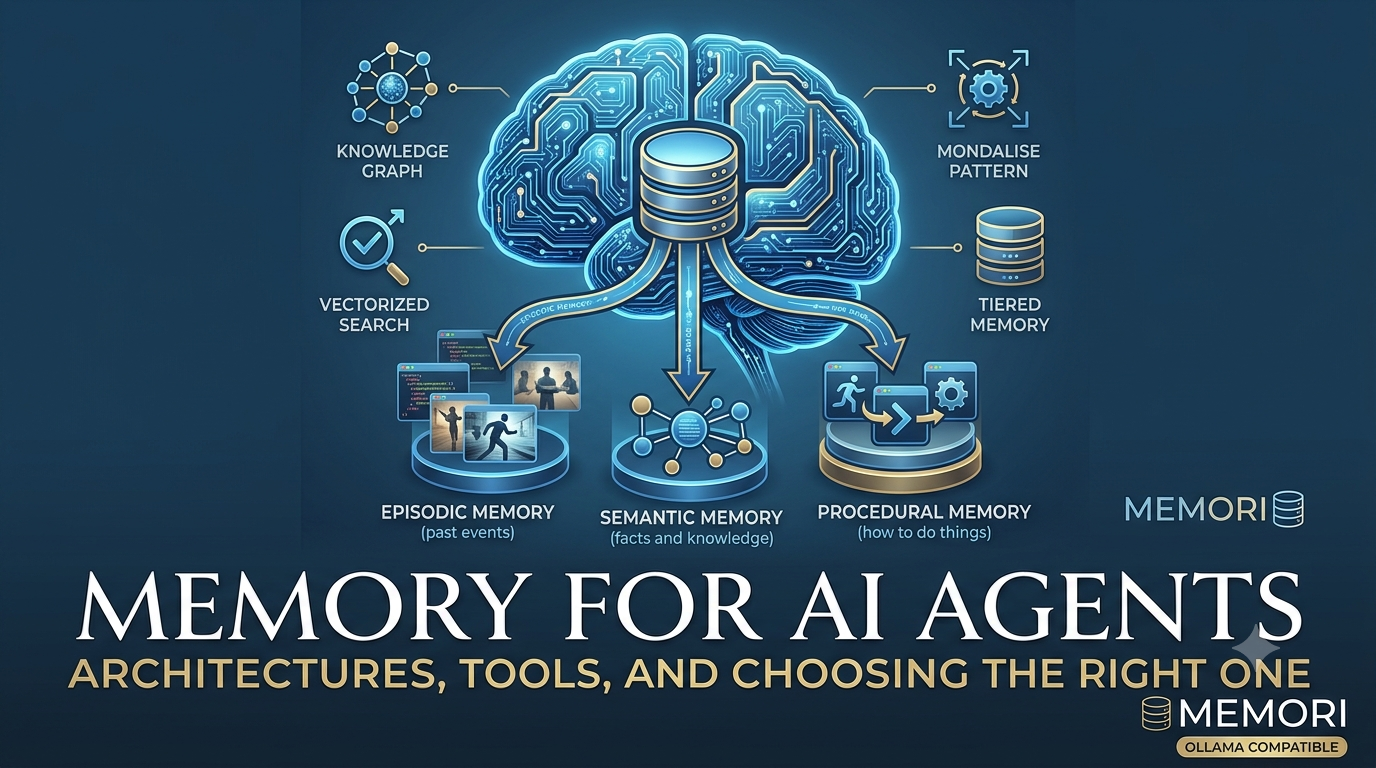
Imagine talking to someone who forgets everything the moment you stop speaking. Every conversation starts from zero. No context. No learning. No continuity.
That’s how most AI chatbots work today. They’re stateless—they have no memory of past interactions. But “agentic AI” is changing that. An agent is an AI that can take actions, use tools, and pursue goals over time. To do that well, it needs memory—just like a human.
This piece breaks down the memory problem for AI agents, the main architectural patterns, the tools available, and the criteria you should use to choose the right one. At the end, I’ll share a recommendation that stands out for production systems.
1. Why AI Agents Need Memory
Without memory, an AI agent:
- Repeats mistakes.
- Forgets user preferences.
- Loses context across sessions.
- Can’t learn from its own actions.
- Feels like a stranger every time you talk to it.
Memory turns a chatbot into a colleague. It lets the agent remember what was said, what was done, and what worked. That’s the foundation of agentic AI.
2. The Four Types of AI Memory (In Simple Terms)
Most frameworks borrow from human cognition and split memory into four types:
| Type | What It Holds | Example |
|---|---|---|
| Working Memory | The “right now” | Current conversation, active task |
| Episodic Memory | “What happened” | Past conversations, actions, outcomes |
| Semantic Memory | “Facts and knowledge” | User preferences, world facts |
| Procedural Memory | “How to do things” | Learned skills, successful action sequences |
A good agent memory system needs to handle all four—or at least the ones relevant to its job.
3. Architectural Patterns for Agent Memory
There’s no single way to build memory. Here are the main patterns, from simplest to most advanced:
a) Simple In-Process Memory
Everything stays in the current conversation window. Easy, but the agent forgets once the session ends.
b) External Vector Store
The agent saves memories in a database and retrieves relevant ones using semantic search. Like a searchable notebook.
c) Tiered Memory Architecture
Layered storage: “hot” (fast, recent), “warm” (less frequent), and “cold” (archival). Balances speed and capacity.
d) Knowledge Graph Memory
Memories are stored as connected nodes (entities and relationships). Helps the agent reason about how facts relate.
Each pattern has trade-offs in cost, latency, complexity, and accuracy.
4. The Tool Landscape: A Quick List
Here are the most talked-about memory tools for AI agents today:
- Mem0 – Plug-and-play conversational memory. Good for simple use cases.
- Letta (formerly MemGPT) – Pioneered agents that edit their own memory.
- Zep – Focuses on temporal reasoning—how memories change over time.
- LangChain / LangMem – Memory components inside a broader agent ecosystem.
- Memori – A SQL-native, structured memory layer that remembers actions, not just chat.
Each has strengths. The right choice depends on your specific requirements.
5. How to Choose a Memory Tool
Before picking a tool, ask:
- What does it remember? Just chat, or also tool calls and outcomes?
- Where is memory stored? Proprietary vector store, or your own database?
- Can you audit it? Can you inspect and query memories directly?
- How much does it cost? Tokens per query matter at scale.
- How fast is it? Does memory creation slow down the agent?
- Can you deploy it your way? Cloud, on-prem, or bring your own database?
- Does it forget intelligently? Stale memories should fade; important ones should stay.
- Does it work with your inference stack? If you run local models, does the tool support them natively?
These criteria will guide you to the right tool for your use case.
6. Evaluating the Options: Why Memori Stands Out
After applying the criteria above, one tool consistently rises to the top for production agents: Memori.
Memori isn’t just another memory tool. It treats memory as a data structuring problem, not a text-stuffing problem. Here’s why that matters:
✅ SQL-Native and Auditable
Memori uses everyday databases like SQLite, PostgreSQL, or MongoDB. You can inspect, query, and audit memories directly. No black-box vector store.
✅ Remembers Actions, Not Just Chat
Most tools capture conversation. Memori also captures tool calls, execution paths, decisions, and outcomes. The agent learns from what it does, not only what it says.
✅ Structured Memory
It converts messy dialogue into clean, queryable facts and relationships. That makes recall more precise and less token-heavy.
✅ Intelligent Recall + Decay Scoring
Memories that are accessed often and recently get prioritized. Stale ones fade away. This keeps context relevant without manual cleanup.
✅ Performance and Cost
On the LoCoMo benchmark (a standard long-context memory test), Memori reportedly achieved 81.95% accuracy—outperforming Mem0 (62%), LangMem (78%), and Zep (79%). And it did this using only **1,294 tokens per query**, roughly 5% of the cost of stuffing the full conversation into the prompt.
✅ Deployment Flexibility
Use Memori Cloud, or bring your own database (BYODB) for full control. Great for enterprise, on-prem, or VPC deployments.
✅ Native Ollama Integration — A Platform Capability, Not an Afterthought
Memori is LLM-agnostic by design, and local OpenAI-compatible endpoints like Ollama, vLLM, and llama.cpp are treated as first-class providers. This matters because a growing share of agent development happens on local or self-hosted inference, yet many memory layers assume a cloud LLM.
Memori supports Ollama through three concrete mechanisms:
- Universal provider support. Memori ships with tested examples for OpenAI, Azure OpenAI, LiteLLM, and Ollama. Its “any OpenAI-compatible” configuration path means most local inference servers work out of the box.
- LiteLLM as a bridge. Ollama is supported natively via LiteLLM, so the same memory pipeline that talks to GPT-4 or Claude can also talk to a locally running Llama or Qwen model without code changes.
- Local embeddings stay local. Memori’s retrieval layer supports Ollama embeddings (e.g.,
nomic-embed-text), so the entire memory pipeline—extraction, augmentation, and recall—can run entirely offline.
For anyone building a local-first agent stack, this is the difference between a memory layer that can work with your inference engine and one that does work with it by design.
7. Multi-Agent Memory: Shared, Not Distributed
When you have more than one AI agent, a key question is: what should they share, and what should stay private?
Memori uses a shared memory database with clear rules about what each agent can see. Think of it like a shared notebook for all your agents, but with different sections that are locked or open.
There are three main levels of separation:
👤 User Level (Shared Across All Agents)
All agents that serve the same user share basic facts and preferences. For example, if you tell your support bot that you use PostgreSQL, your sales bot can later say, “I see you use PostgreSQL—here’s a product that works well with it.” The sales bot doesn’t need to ask you again.
What’s shared at this level:
- Facts (e.g., “Alice uses PostgreSQL”)
- Preferences (e.g., “Alice prefers email over phone”)
- Skills (e.g., “Alice knows Python”)
- Knowledge graph (connections between facts)
🤖 Agent Level (Private to Each Agent)
Each agent has its own private notes about how it works. The support bot and the sales bot each have their own attributes and conversation histories. The sales bot doesn’t see the full chat log from the support bot.
What’s private at this level:
- Attributes (e.g., the support bot’s tone settings)
- Conversation history (each agent keeps its own record of what was said)
💬 Session Level (Private to Each Conversation)
Even within the same agent, each conversation session is kept separate. If you start a new chat with the support bot, it remembers you use PostgreSQL (from the shared user memory), but it doesn’t remember the exact words from your previous chat session.
What’s private at this level:
- The specific messages exchanged in that session
- The context of that particular conversation
A Simple Example
Imagine you have two agents: a personal assistant and a shopping helper.
- You tell your personal assistant: “I love dark roast coffee.”
- Later, you ask your shopping helper: “What coffee should I buy?”
- The shopping helper can say: “Since you love dark roast, here are some options.”
- But the shopping helper cannot see the entire conversation you had with the personal assistant—only the fact that you love dark roast.
That’s the balance: shared knowledge, private conversations.
Summary Table
| What is it? | Who can see it? | Example |
|---|---|---|
| Facts & Preferences | All agents for the same user | “Alice uses PostgreSQL” |
| Skills | All agents for the same user | “Alice knows Python” |
| Attributes | Only the specific agent | Support bot’s tone settings |
| Conversation history | Only the specific agent + session | The exact messages in one chat |
So Memori is not a peer-to-peer system where each agent has its own memory that syncs with others. It’s a central shared memory with smart rules about who sees what. That makes it easier to build multi-agent systems where agents collaborate without stepping on each other’s toes.
8. When Memori Might Not Be the Best Fit
Memori is powerful, but it’s not for everyone. If you need a quick, plug-and-play memory for a simple chatbot, Mem0 might be easier. If you want an agent that rewrites its own memory in a research setting, Letta is interesting. But for production agents that need structured, auditable, cost-efficient memory across many sessions and multiple agents, Memori is a very strong candidate.
9. The Big Takeaway
Memory is not just a feature. It’s a fundamental architecture problem.
For AI agents to be truly useful over long periods, they need a well-designed memory system that can store, retrieve, and forget information intelligently. Stop treating memory as an afterthought. Design it as a first-class part of your agentic AI system.
And if you want a memory layer that’s structured, SQL-native, action-aware, cost-efficient, Ollama-compatible, and shared across multiple agents with smart isolation—Memori is a very strong place to start.
References
Cognitive architecture for AI memory. “Your Model Has Humanity’s Cortex. It Needs Its Own Hippocampus.” Medium. https://medium.com/codetodeploy/your-model-has-humanitys-cortex-it-needs-its-own-hippocampus-36a4b9676c8d
Local AI workstation setup. “I Turned My Mac Mini Into a Local AI Workstation — Here’s Exactly How.” Hashnode. https://nightthoughts.hashnode.dev/i-turned-my-mac-mini-into-a-local-ai-workstation-here-s-exactly-how
Memori overview. Memori Labs. “Introducing Memori Cloud: Fully Hosted SQL-Native Memory Layer for AI Agents.” https://memorilabs.ai/blog/launching-memori-cloud/
Memori multi-user isolation model. Memori Docs. “Multi-User Support.” https://memorilabs.ai/docs/memori-cloud/concepts/multi-user-support/
Memori LoCoMo benchmark results. Memori Labs. “Releasing Our LoCoMo Benchmark Paper.” https://memorilabs.ai/blog/memori-locomo-paper-results/
Memori LLM provider support (Ollama, vLLM, llama.cpp). Memori Manual — Doramagic. https://doramagic.ai/en/projects/memori/manual/
Memory tool comparison (Letta, Mem0, Zep, LangMem). LoCoMo Benchmark Results. Hugging Face. https://huggingface.co/datasets/rovemark/locomo-benchmark-results/blob/main/README.md
Note: Benchmark numbers are based on Memori’s published results. Always verify with your own use case before choosing a tool.