

Traditional Vector RAG vs. PageIndex: What's the Difference?
Imagine you need to answer a specific question using a 200-page financial report.
How would you do it? You would open the document, look at the Table of Contents, find the right chapter, turn to those pages, and read the entire section to understand the full context.
Most standard AI search systems do not read documents this way. Instead, they use a process called Retrieval-Augmented Generation (RAG), which cuts documents into tiny, disconnected pieces before searching them.
An open-source framework called PageIndex changes this approach. Here is a clear breakdown of how traditional Vector RAG works, how PageIndex offers a vectorless alternative, and where each approach shines.
What is PageIndex and Who Created It?
PageIndex is an open-source framework designed to give AI models a better way to search and analyze long documents without using vector databases or fixed text chunking. It is known as a vectorless, reasoning-based RAG engine.
PageIndex was created by the team at Vectify AI (led by researchers including Mingtian Zhang and Yu Tang) and released on GitHub.
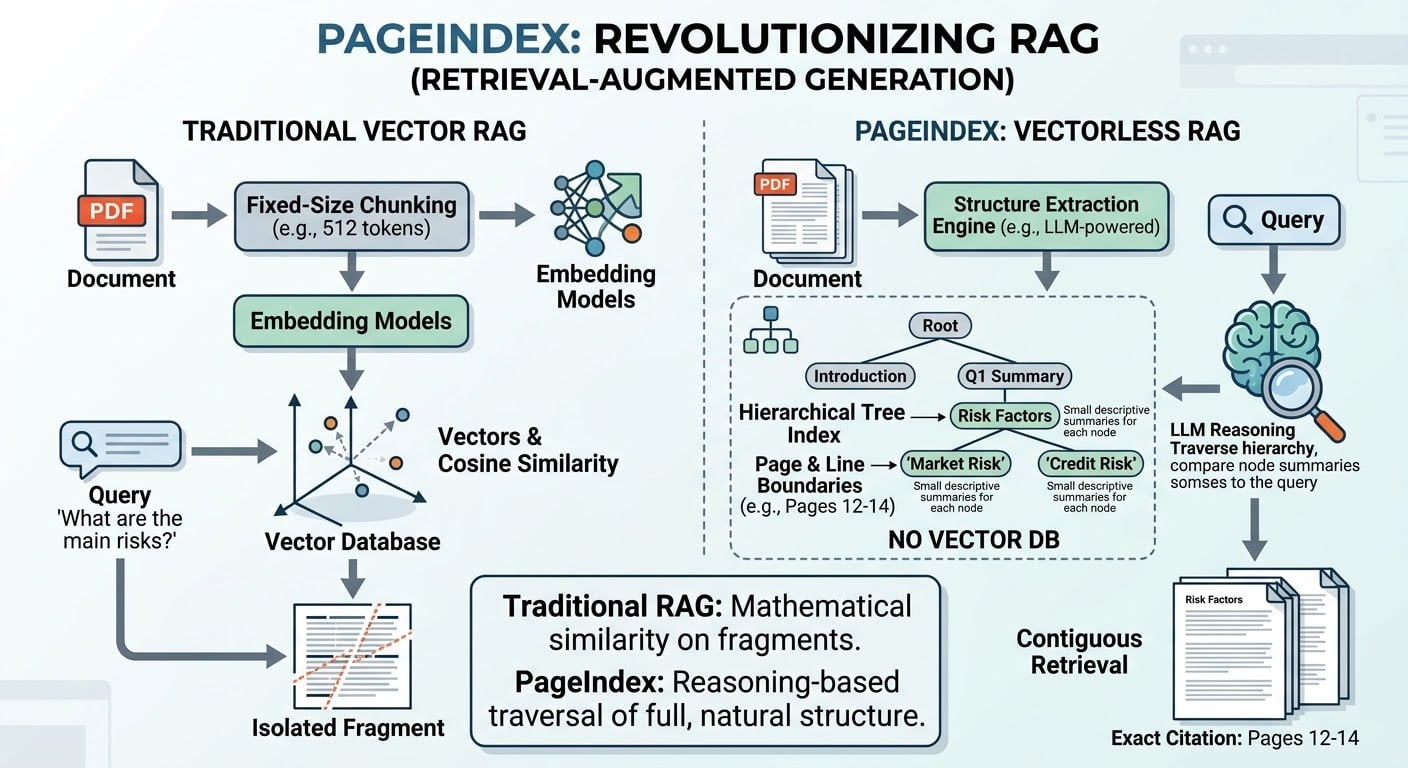
Instead of converting text into abstract mathematical numbers (vectors), PageIndex converts documents into a hierarchical tree structure—essentially a detailed, machine-readable Table of Contents complete with page boundaries and section summaries.
Traditional Vector RAG vs. PageIndex: Step-by-Step
To understand how PageIndex changes document retrieval, compare how both systems process a complex document.
| Process Step | Traditional Vector RAG | PageIndex (Vectorless RAG) |
|---|---|---|
| 1. Document Ingestion | Cuts documents into small, fixed-size chunks (e.g., 512 words). | Extracts the document's natural structure (chapters, headers, subsections). |
| 2. Information Indexing | Converts text chunks into mathematical numbers stored in a Vector DB. | Builds a hierarchical Tree Index with node summaries and exact page/line coordinates. |
| 3. Query Retrieval | Compares query vectors against chunk vectors using mathematical distance. | An AI model reasons through the tree branch-by-branch to locate the target section. |
| 4. Final Context Delivered | Pulls 1–2 isolated text snippets without surrounding context. | Pulls complete contiguous sections/pages with exact page citations. |
Key Benefits of PageIndex
Preserves Full Context: Traditional RAG often cuts a sentence or table in half across chunk boundaries. PageIndex retrieves contiguous physical pages, ensuring the AI model sees the complete thought.
High Traceability: Every answer points back to an exact section and page range (e.g., "Pages 12–14"), making it straightforward to double-check source facts.
No Vector Database Infrastructure: You do not need to set up, maintain, or manage external vector databases like Pinecone or ChromaDB.
Higher Accuracy on Complex Docs: On structured reports, reasoning through section hierarchies yields significantly higher answer accuracy than matching isolated keywords or phrases.
Where PageIndex Isn't Perfect: The Limitations
While PageIndex fixes major flaws in traditional chunk-based retrieval, it is not a solution for every problem. It comes with clear trade-offs:
Higher Latency (Slower Retrieval): Because PageIndex relies on an LLM to read through tree nodes and navigate branches step-by-step, queries take longer than fast vector math lookups.
Higher API Token Costs: Traversing node summaries with an LLM sends more tokens back and forth, which increases the execution cost per query.
Requires Structured Documents: PageIndex relies on documents having a logical layout (headers, titles, clear sections). It struggles with completely unstructured text, poor OCR scans, or unorganized text files.
Not Ideal for Massive Multi-Document Pools: If you need to search across 100,000 separate 1-page customer support emails simultaneously, traditional vector search remains much faster and more scalable.
Choosing the Right Tool for Your Project
Selecting between Traditional Vector RAG and PageIndex depends on your data structure and query requirements.
Use PageIndex when working with long, structured documents—such as financial 10-K filings, legal contracts, technical manuals, or research papers—where accuracy, full context, and exact page citations are required.
Use Traditional Vector RAG when you need sub-second search speeds across thousands of short, unstructured files, or where low latency and lower token costs outweigh the need for deep contextual reasoning.
To explore the codebase and run a quickstart implementation, visit the official repository at VectifyAI/PageIndex on GitHub.